
Nowadays, many Facebook users are trending toward adding songs to their personal profiles, making them more vibrant and helping express their unique mood and music taste. Do you want to transform your profile into something more distinctive and impressive? The article below from Like3s is a complete guide showing you the simplest and fastest way to add music to your Facebook profile.
Did you know? The secret to making your posts more likable and growing likes faster
I. The Concept and Benefits of Adding Music to Your Facebook Profile:
This is a feature that allows users to display their favorite songs directly on their profile. When visiting your profile, friends can view and listen to the music clip you have chosen, helping express your personality, emotions, and unique music taste.
Why is this feature so popular among Gen Z and Gen Y? Let's take a look at a few standout benefits. First of all, adding a song to your profile is also a way to express your personality, making your profile less boring and monotonous. In addition, pinning music to your "wall" also helps you express your emotions and mood through the lyrics of a song in a very subtle way. Therefore, if you want your profile to stand out and quickly make an impression on others, don't miss this — because this article will show you an extremely simple way to add music to your Facebook profile.
II. Complete Guide on How to Add Music to Your Facebook Profile:
Preparation Step (Required):
To add music to your Facebook profile, you first need to save that song to your list. This is a necessary step to use the feature of pinning music to your profile.
Step 1: Access the Music section
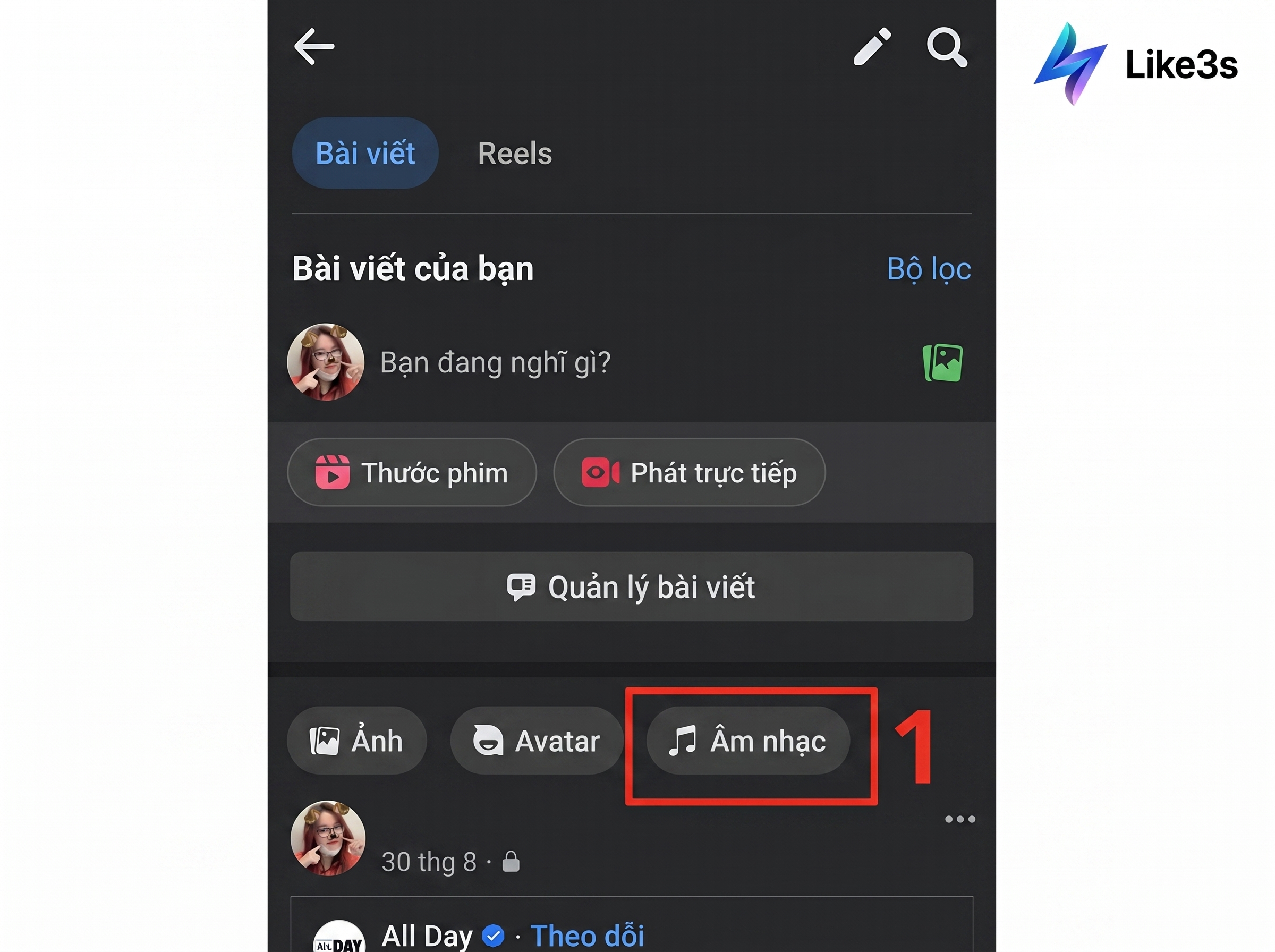
In the Facebook app, tap on your personal profile. Scroll down and select the Music section (next to the Photos and Avatar sections).
Step 2: Search for a song
In the Music interface, tap the plus (+) icon in the top right corner of the screen.
Enter the name of the song or artist you like in the search bar. You can preview it by tapping the Play button next to the song.
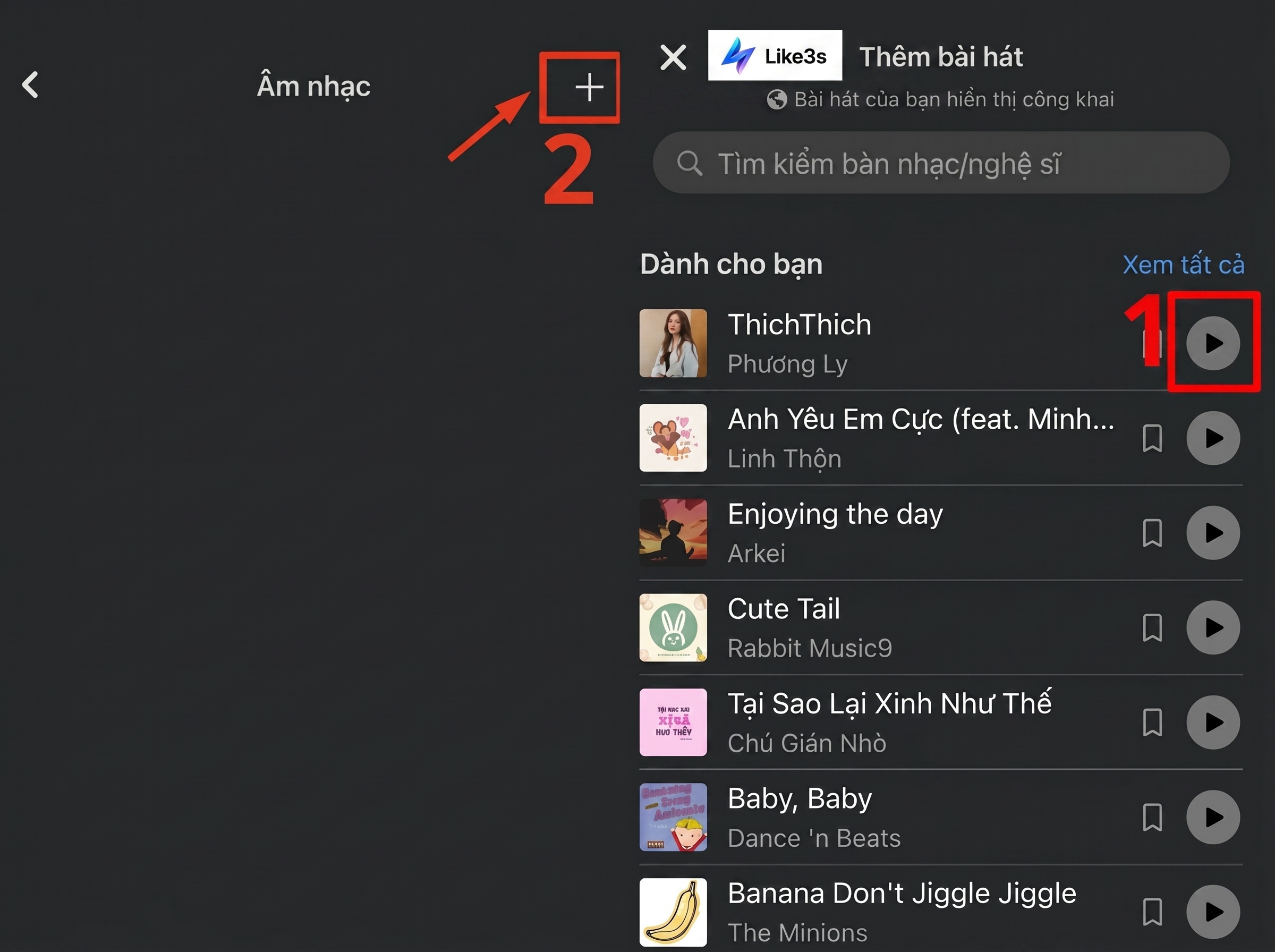
Tap the plus (+) icon
Step 3: Add the song to your list
Once you have found the song you like, tap directly on it to add it to your music list.
After selecting, go back to the Music section interface, and you will see the list of selected songs appear there.

After selecting, go back to the Music section interface
Step to Add a Song to Your Profile (Important):
After completing the step of selecting your favorite song as above, the next step is to add that song to your Facebook profile:
Step 1: Stay in the Music section interface (where the list of songs you just added is stored).
Step 2: Tap the three-dot icon (...) next to the name of the song you want to display. In the options menu, select Pin to Profile.
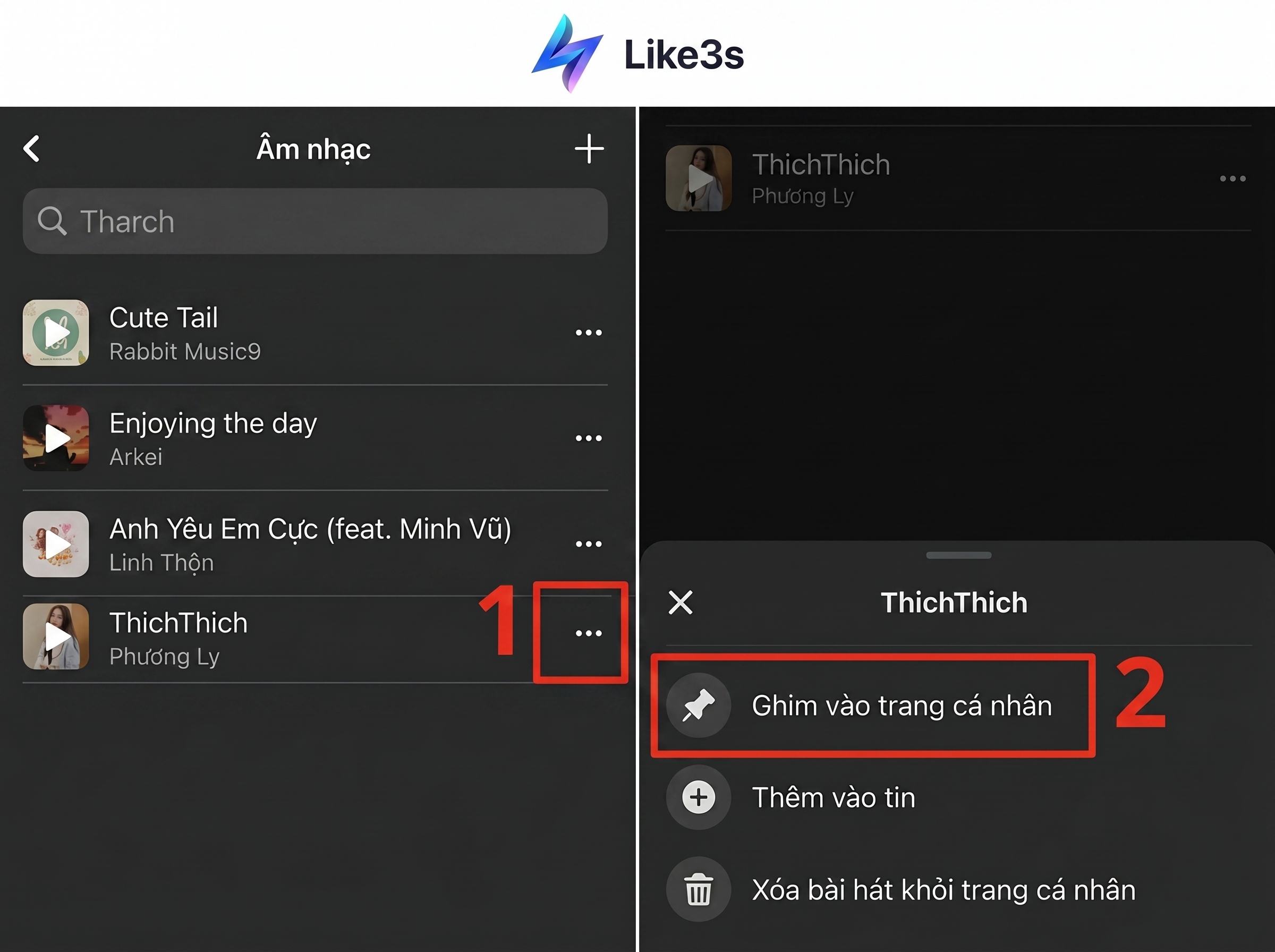
Step 3: Go back to your main profile, refresh the page (pull the screen down), and you will see the song appear right below your name and profile picture.
III. Things to Note When Adding Music to Your Facebook Profile
Adding Music to Your Facebook Profile Is Not Supported on Computers (PC/Laptop)
This is the most common question among users. Currently, Facebook's Music feature is designed with a Mobile-first priority.
Cannot pin music from a computer: You cannot search for, add, or pin songs to your profile when using a web browser on a computer (Chrome, Cốc Cốc, etc.).
Limited listening experience: When you (or your friends) visit a profile on a computer, the pinned song usually only displays the song title and artist name. Viewers cannot press the Play button to listen to music directly as on a phone.
Therefore, for the full experience of this feature, always use the Facebook app on an Android phone or iPhone/iPad.
Cannot Upload Music from External Sources
Facebook's music library is extremely diverse thanks to its partnerships with major music platforms, but some songs are still restricted.
You can only choose songs that are available in Facebook's library.
You cannot upload MP3 files from your phone or computer to use as background music. This is to ensure compliance with the music copyright agreements that Facebook has signed.
Short Music Playback Duration
The background music only plays a short clip (about 30 seconds), usually the chorus — it does not play the full song like a music streaming app.
IV. Conclusion
In summary, should you add music to your Facebook profile? The answer is yes, because adding music to your "wall" is a great way to refresh your digital image and affirm your personal style. Although it is somewhat limited due to not being fully supported on computers, it is still a feature well worth experiencing for mobile users.
The article above from Like3s is your go-to guide for answering questions about how to add music to your Facebook profile in the simplest and most detailed way. Don't let your Facebook profile become boring — read the guide above to create a profile that reflects your own personality and style with the power of music!
See also:
The Like3s content team — sharing algorithm insights, case studies and channel-building strategy.